맵
특정 키를 사용하여 값을 검색하는 기능을 제공하는 컨테이너
맵은 키를 활용하여 값과 쌍으로 저장하고 검색
맵의 선언
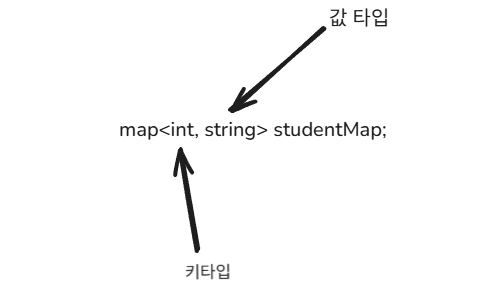
맵을 선언할 때는 키-값 쌍을 저장하기 위해 키 타입과 값 타입 두 가지를 지정해야 합니다.
이 두 타입은 동일할 수도 있고, 서로 다를 수도 있으며, 키 타입은 비교 연산이 가능해야 합니다.
#include <iostream>
#include <map>

using namespace std;

// 정수 키와 문자열 값을 저장하는 map 예제
int main() {
    map<int, string> studentMap;

    // 요소 추가
    studentMap[101] = "Alice";
    studentMap[102] = "Bob";
    studentMap[103] = "Charlie";

    // 요소 출력
    for (const auto& pair : studentMap) {
        cout << "ID: " << pair.first << ", Name: " << pair.second << endl;
    }

    return 0;
}

/*
출력 결과:
ID: 101, Name: Alice
ID: 102, Name: Bob
ID: 103, Name: Charlie
*/
맵의 동작
맵은 키 순으로 오름차순 정렬을 유지합니다.
사용자가 별도로 정렬을 수행하지 않아도, 삽입 및 삭제가 이루어질 때마다 내부적으로 정렬 상태를 유지합니다.
    studentMap[101] = "Alice";
    studentMap[103] = "Charlie";
    studentMap[102] = "Bob";

/*만약 이렇게 선언되어도
출력 결과:
ID: 101, Name: Alice
ID: 102, Name: Bob
ID: 103, Name: Charlie
*/
insert( )
make_pair( )를 이용하여 pair 객체를 생성한 후 insert 함수를 사용할 수 있습니다.
또한 { }를 활용한 방법이나 [ ]를 사용하여 값을 추가할 수도 있습니다.
//insert()와 make_pair() 사용한 추가

#include <iostream>
#include <map>

using namespace std;

int main() {
    map<int, string> myMap;

    // make_pair()를 사용하여 insert()
    myMap.insert(make_pair(1, "Apple"));
    myMap.insert(make_pair(2, "Banana"));
    myMap.insert(make_pair(3, "Cherry"));

    // 출력
    for (const auto& pair : myMap) {
        cout << "Key: " << pair.first << ", Value: " << pair.second << endl;
    }

    return 0;
}

/*
출력 결과:
Key: 1, Value: Apple
Key: 2, Value: Banana
Key: 3, Value: Cherry
*/
//insert()와 {}사용한 추가

#include <iostream>
#include <map>

using namespace std;

int main() {
    map<int, string> myMap;

    // {}를 사용하여 insert()
    myMap.insert({4, "Dog"});
    myMap.insert({5, "Elephant"});
    myMap.insert({6, "Frog"});

    // 출력
    for (const auto& pair : myMap) {
        cout << "Key: " << pair.first << ", Value: " << pair.second << endl;
    }

    return 0;
}

/*
출력 결과:
Key: 4, Value: Dog
Key: 5, Value: Elephant
Key: 6, Value: Frog
*/
//[]연산자를 사용한 추가
#include <iostream>
#include <map>
using namespace std;
int main() {
map<int, string> myMap;
// [] 연산자로 값 추가
myMap[7] = "Giraffe";
myMap[8] = "Horse";
myMap[9] = "Iguana";
// 출력
for (const auto& pair : myMap) {
cout << "Key: " << pair.first << ", Value: " << pair.second << endl;
}
return 0;
}
/*
출력 결과:
Key: 7, Value: Giraffe
Key: 8, Value: Horse
Key: 9, Value: Iguana
*/find( )
find 메서드를 사용하면 특정 키가 map에 존재하는지 확인할 수 있습니다.
find는 키가 존재하면 해당 키의 이터레이터(iterator)를 반환하고, 존재하지 않으면 map.end( ) 를 반환합니다.
#include <iostream>
#include <map>

using namespace std;

int main() {
    map<int, string> myMap = {
        {1, "Apple"},
        {2, "Banana"},
        {3, "Cherry"}
    };

    int key = 2;
    auto it = myMap.find(key); // 키 2를 찾기

    if (it != myMap.end()) {
        cout << "Found! Key: " << it->first << ", Value: " << it->second << endl;
    } else {
        cout << "Key " << key << " not found!" << endl;
    }

    return 0;
}

/*
출력 결과:
Found! Key: 2, Value: Banana
*/
auto it = myMap.find(key); 키 2를 찾기라고 하고, key값을 가진 객체를 it에 저장합니다.
it -> first 는 iterator 객체의 키값을 반환받고, it -> second는 객체의 밸류 값을 반환받습니다.
size( )
맵에 키-값 쌍의 개수를 반환하는 함수입니다.
#include <iostream>
#include <map>

using namespace std;

int main() {
    map<int, string> myMap;

    // 요소 추가
    myMap[1] = "Apple";
    myMap[2] = "Banana";
    myMap[3] = "Cherry";

    // 현재 크기 출력
    cout << "Map size: " << myMap.size() << endl;

    return 0;
}

/*
출력 결과:
Map size: 3
*/
erase(key)
맵의 특정 key를 가진 요소만 삭제합니다.
//특정 key를 가진 요소 삭제

#include <iostream>
#include <map>

using namespace std;

int main() {
    map<int, string> myMap = {
        {1, "Apple"},
        {2, "Banana"},
        {3, "Cherry"}
    };

    cout << "Before erase, size: " << myMap.size() << endl;

    // 특정 키 삭제
    myMap.erase(2);

    cout << "After erase(2), size: " << myMap.size() << endl;

    // 남은 요소 출력
    for (const auto& pair : myMap) {
        cout << "Key: " << pair.first << ", Value: " << pair.second << endl;
    }

    return 0;
}

/*
출력 결과:
Before erase, size: 3
After erase(2), size: 2
Key: 1, Value: Apple
Key: 3, Value: Cherry
*/
//존재하지 않는 키를 삭제할 경우

#include <iostream>
#include <map>

using namespace std;

int main() {
    map<int, string> myMap = {
        {10, "Dog"},
        {20, "Cat"},
        {30, "Rabbit"}
    };

    // 존재하지 않는 키 삭제 시도
    int removed = myMap.erase(40);

    if (removed == 0) {
        cout << "Key 40 not found. No deletion performed." << endl;
    }

    return 0;
}

/*
출력 결과:
Key 40 not found. No deletion performed.
*/
clear
맵에 있는 모든 원소를 삭제하는 함수입니다.
clear는 맵뿐 아니라 대부분 컨테니어에 존재합니다.
#include <iostream>
#include <map>

using namespace std;

int main() {
    map<int, string> myMap = {
        {1, "Apple"},
        {2, "Banana"},
        {3, "Cherry"}
    };

    cout << "Before clear, size: " << myMap.size() << endl;

    // 모든 요소 삭제
    myMap.clear();

    cout << "After clear, size: " << myMap.size() << endl;

    return 0;
}

/*
출력 결과:
Before clear, size: 3
After clear, size: 0
*/